Willwine tutorial
Short how-tos for every person who uses Willwine, the situations you will meet most often, and what the words mean. Pick your role, or search with /.
Willwine keeps the lender's clients, loans, cash and books in one place. Amounts are in Uganda shillings, interest rates are per month, and times are Kampala time. For the full reference, see the handbook.
Screens show sample clients and figures. Names, branches and amounts on your server will differ.
Everyone
The basics
Sign in
- Open your company's Willwine address and choose Sign in.
- Enter your work email and the password your director gave you.
- Change that password straight away: My account at the bottom of the menu.
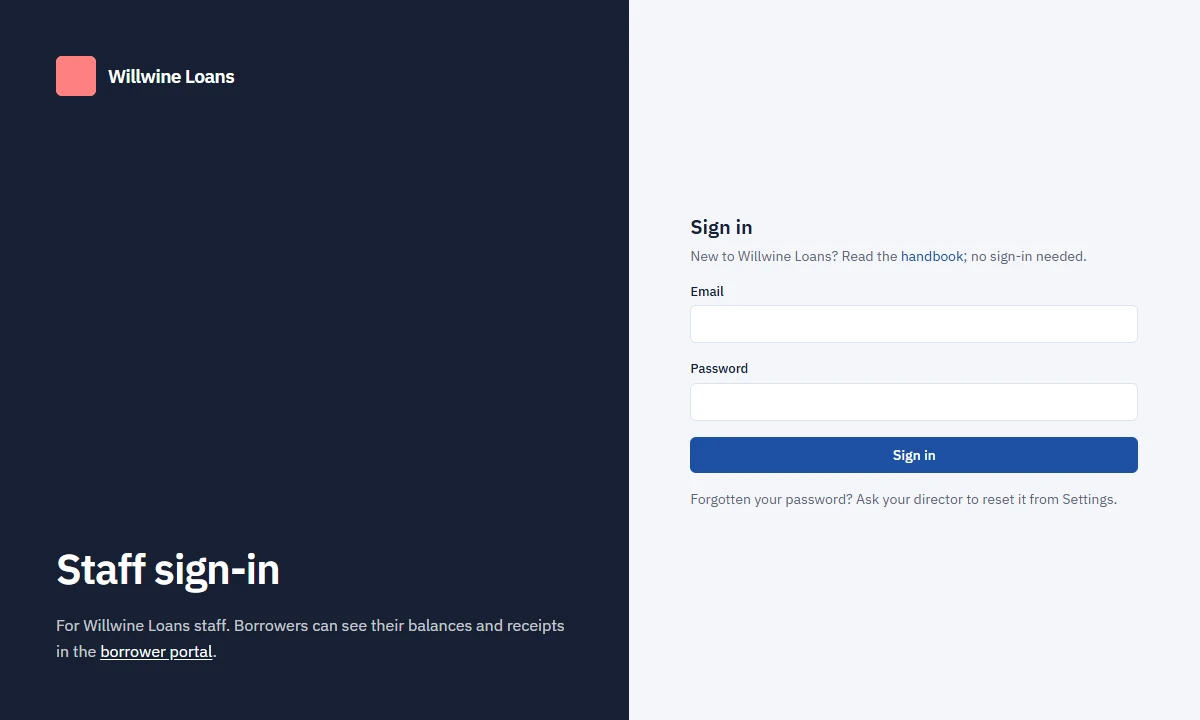
- A sign-in lasts 12 hours. Choose Sign out on shared computers.
- Five wrong passwords lock the account for 15 minutes. A director or accountant can Unlock it sooner.
- Forgotten password? Ask a director to use Reset password for you in Settings → Staff.
Find your way around
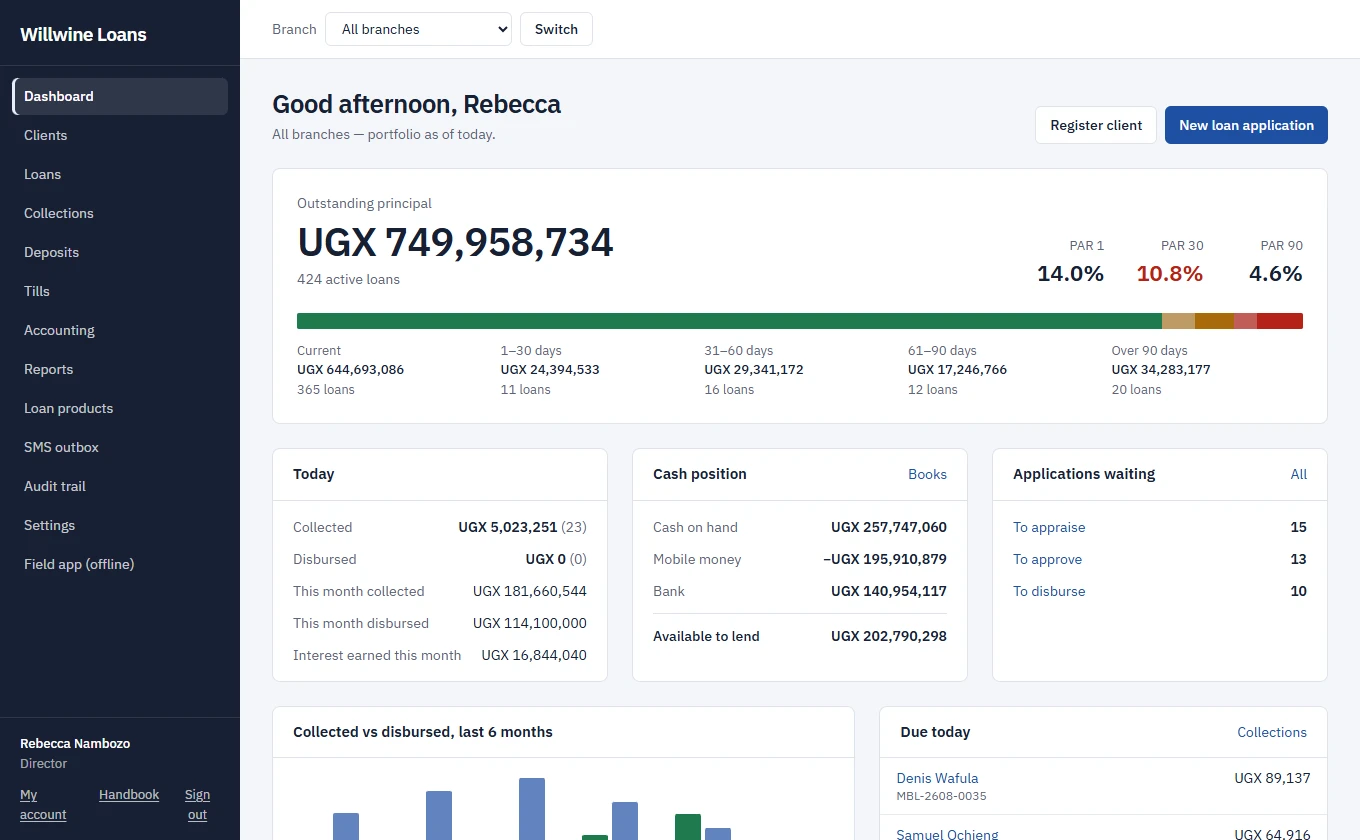
The menu on the left only shows what your role can use. Directors, accountants and auditors see every branch and can pick one with the Branch selector at the top. Everyone else sees only their own branch.
How a loan moves
Other endings: Rejected before pay-out, Rescheduled into a new loan, Written off when it cannot be collected.
No one person can take a loan all the way. Whoever created an application cannot approve it, and whoever approved it cannot pay it out (directors excepted). See maker-checker.
Tutorial by role
Loan officer
You bring in and look after borrowers: register them, take their applications, check they can pay, and follow up when they are late.
You can
- Register and edit clients
- Take applications and appraise them
- Record follow-ups and promises
- Take payments and deposits by mobile money or bank
- Upload documents; use the field app
Someone else does
- Approve or reject (manager, director)
- Pay out loans and handle cash (cashier)
- Reschedule, blacklist (manager)
Register a client
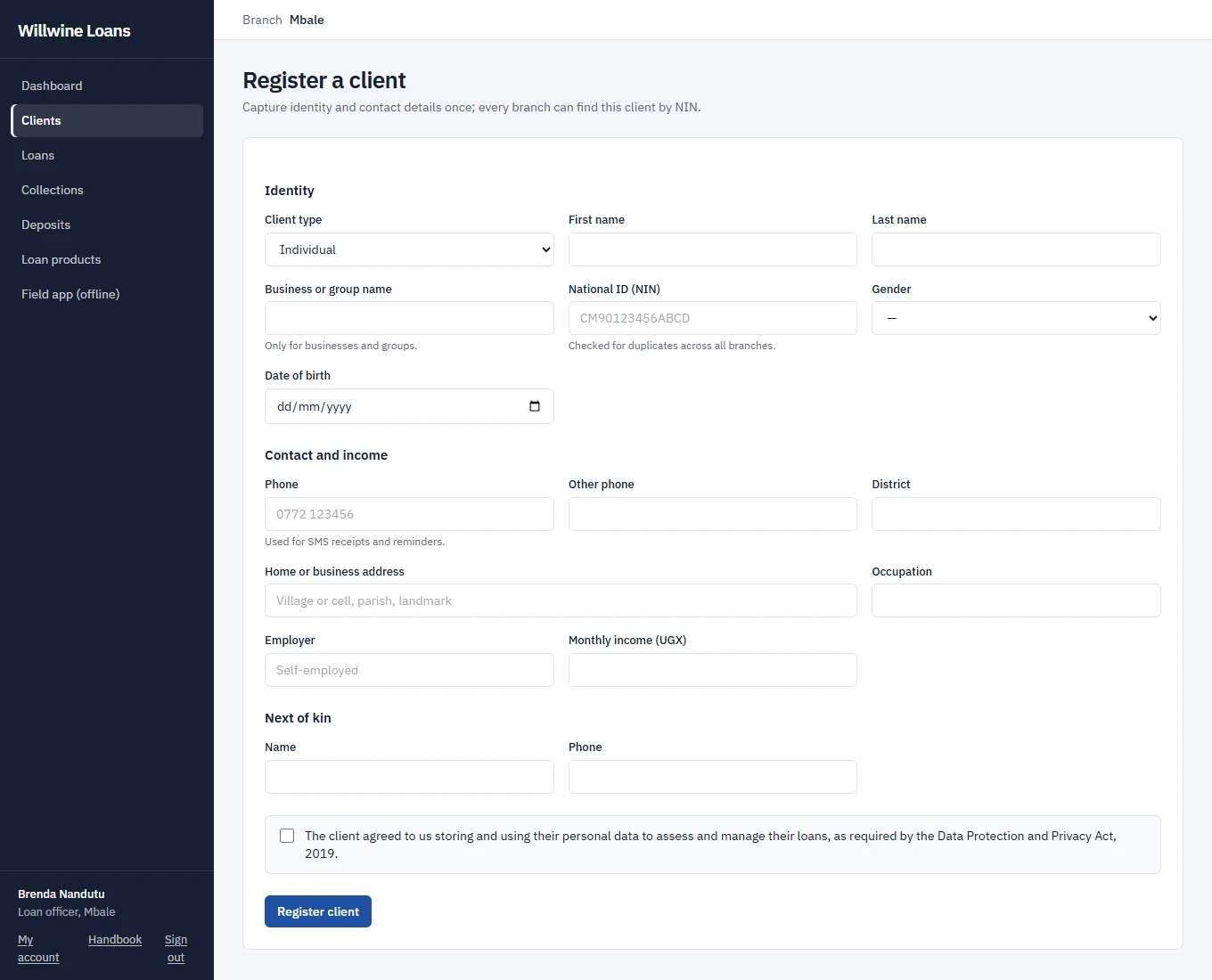
- Clients → Register client.
- Choose Individual, Business or Group, and fill in the name.
- Enter the NIN (Willwine refuses one already registered) and a Ugandan phone number. The phone gets receipts and reminders, so check it.
- Add address, occupation, income and next of kin.
- Tick the consent box once the client agrees, then Register client.
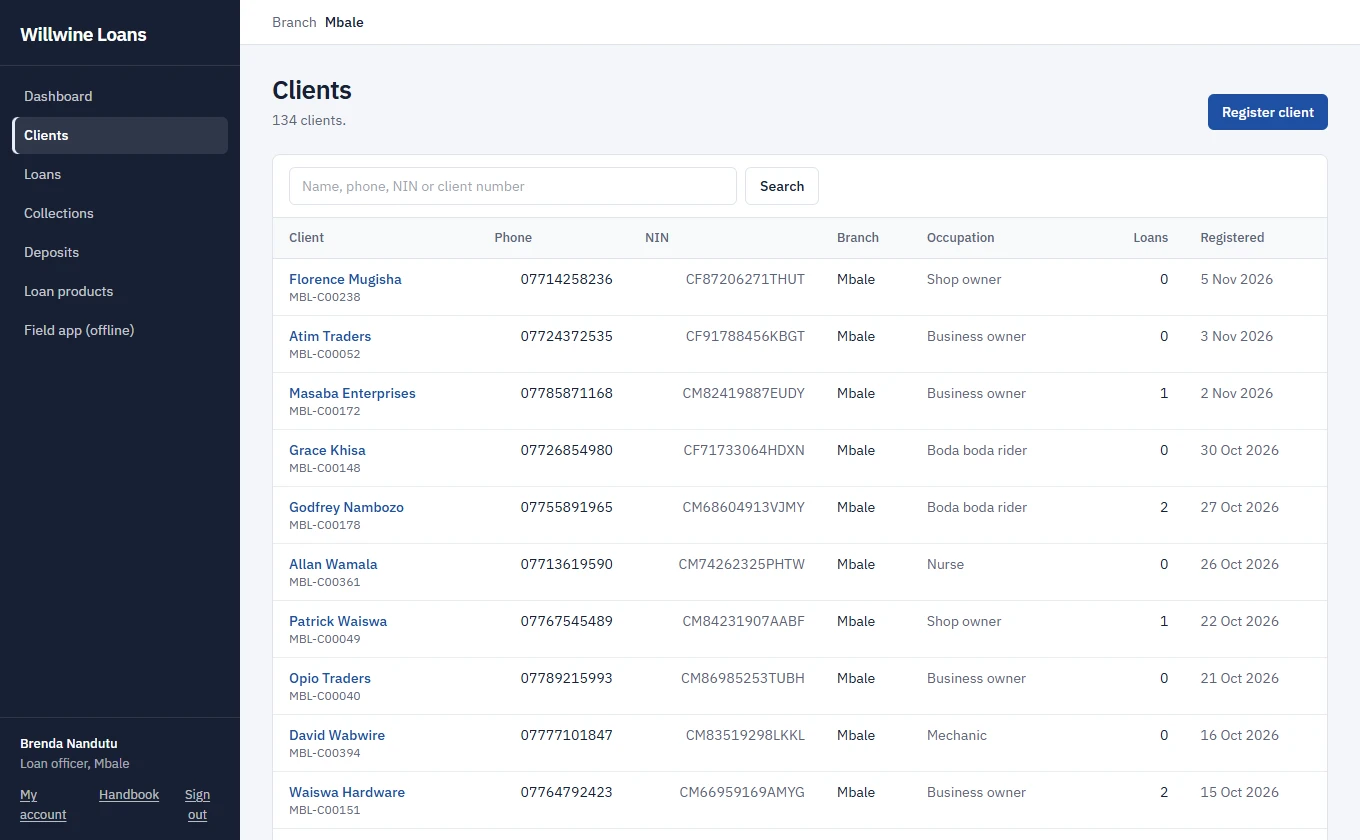
To find someone later, search Clients by name, phone, NIN or client number.
Take a loan application
- On the client's page choose New loan for this client (or Loans → New application).
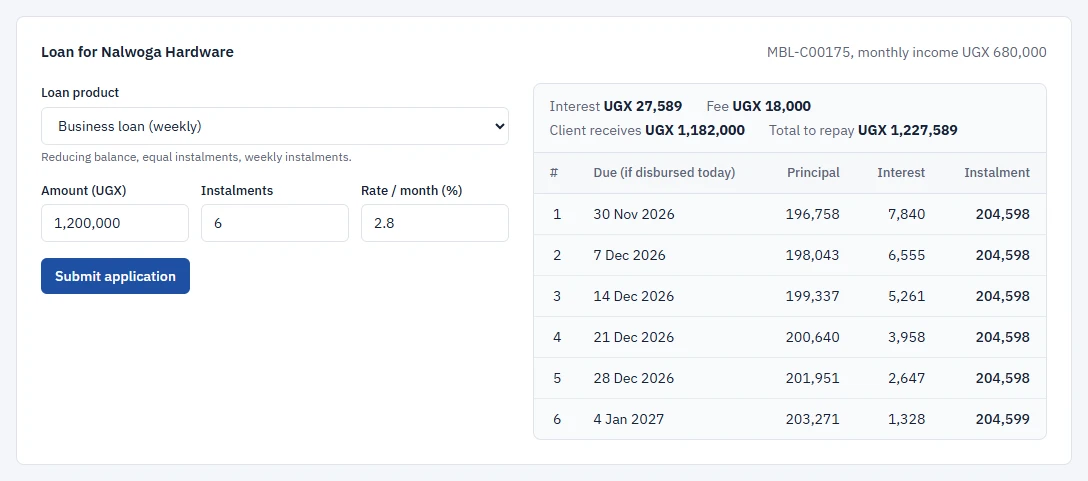
- Pick the loan product, then the amount, number of instalments and rate per month.
- Check the live schedule on the right: interest, fee, what the client receives and every due date.
- Add the purpose, any collateral and a guarantor, then Submit application.
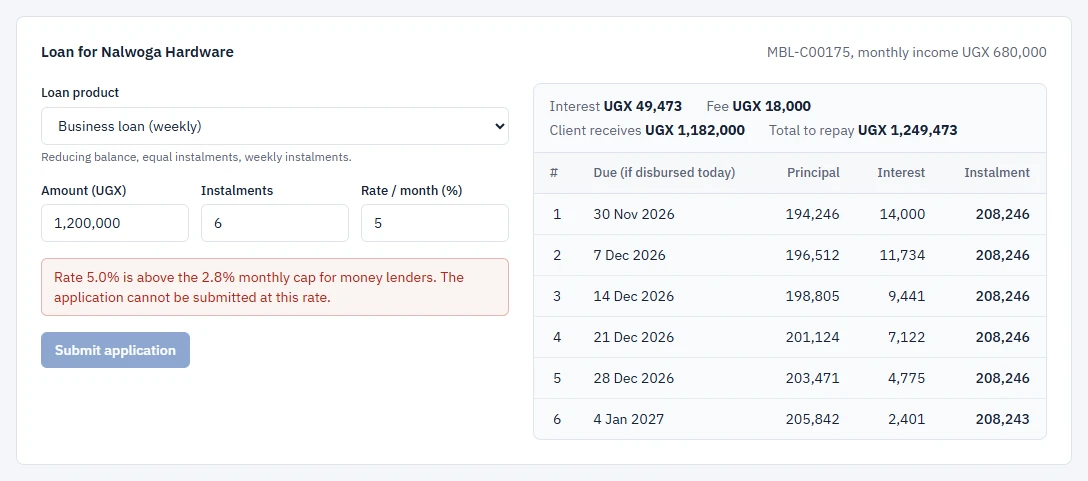
If the rate is above the legal interest cap, the form says so and will not submit:
Appraise
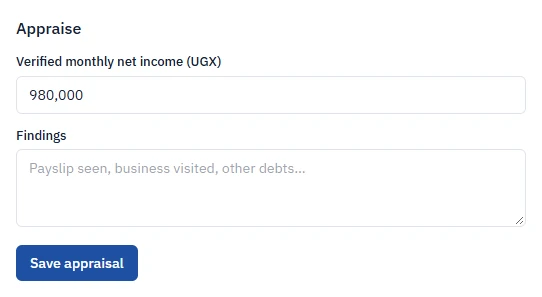
Open the Submitted loan, enter the income you confirmed (payslip, business records, mobile money statements) and what you found, then Save appraisal. The loan becomes Appraised and waits for a manager.
Follow up late payers
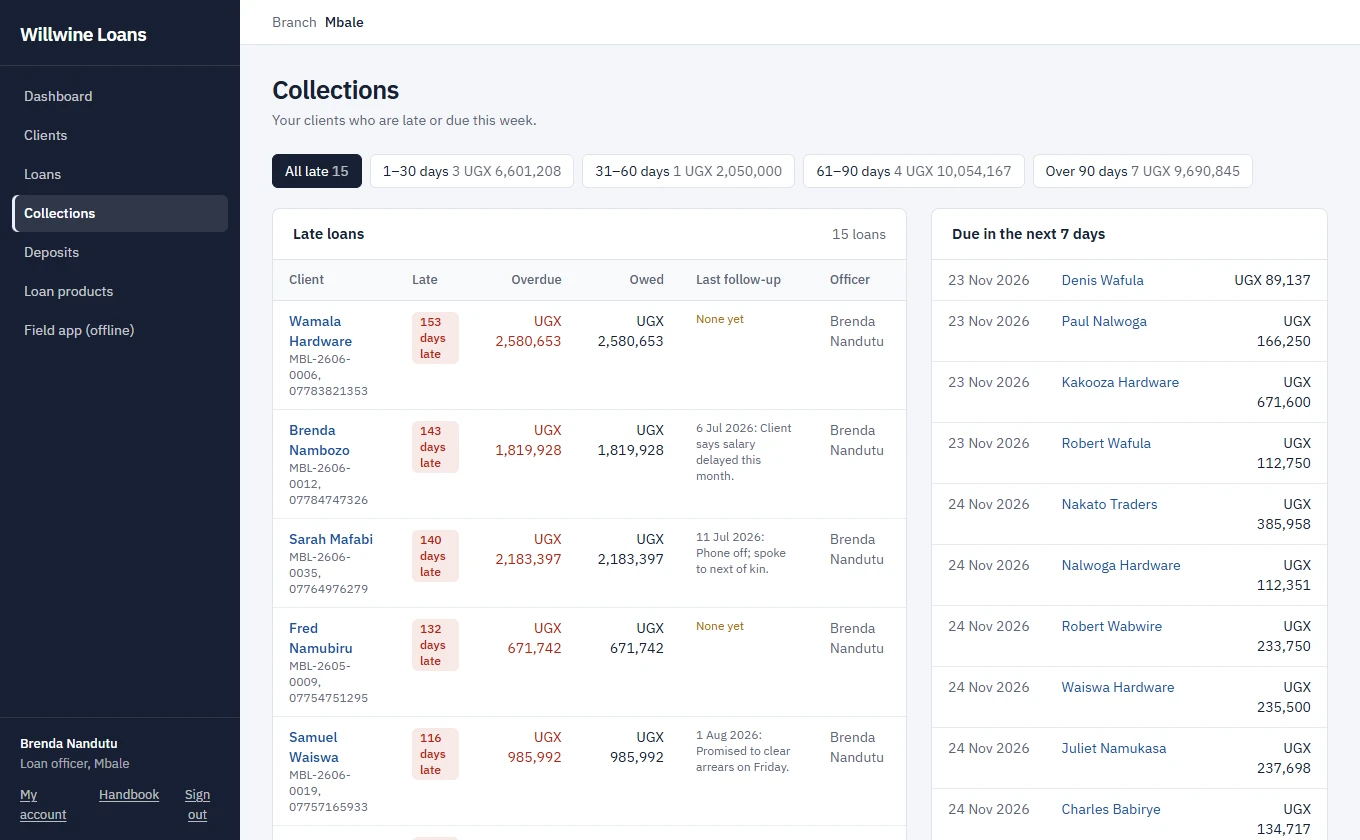
- Open Collections: late loans with days late, amount overdue and the last follow-up, plus who is due in the next 7 days.
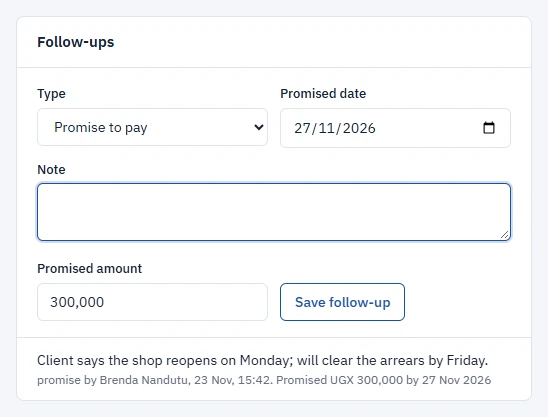
- Call or visit, then on the loan page record it under Follow-ups: Phone call, Visit, Promise to pay (with date and amount) or Note.
Work offline in the field
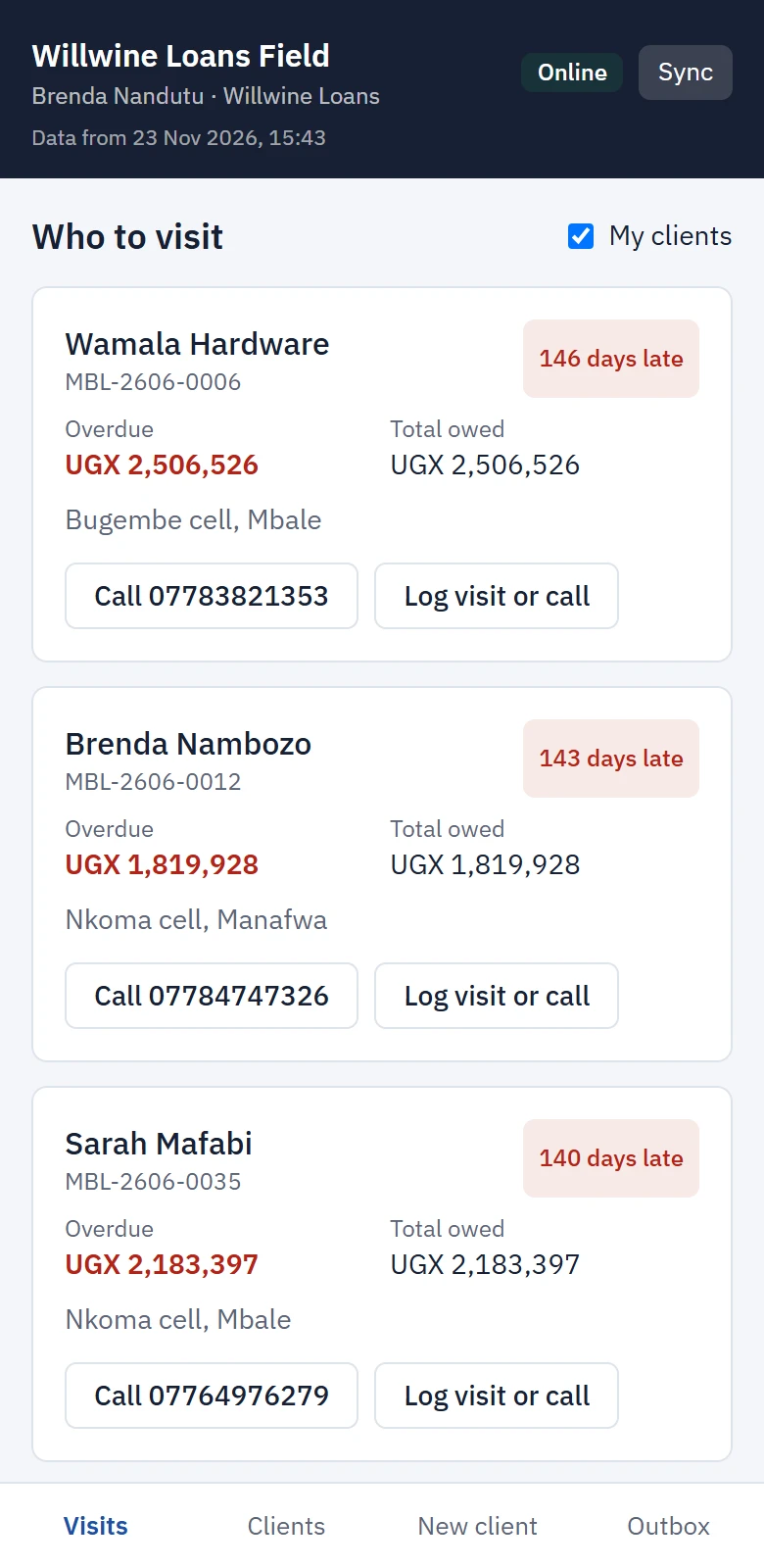
- On your phone, sign in and choose Field app (offline). Install it with Add to Home screen.
- Open it with signal each morning so Who to visit is fresh.
- Offline you can log visits, register clients (with an ID photo) and take applications.
- Everything waits in the Outbox and syncs by itself when you have signal.
Documents and the portal link
- Documents on the client page: National ID, photo, payslips, statements. Loan documents on the loan page: signed agreement, title, logbook. Photos or PDFs up to 5 MB.
- Text portal link on the client page sends the borrower an SMS with the borrower portal address.
Tutorial by role
Cashier
You handle the money: open your till each morning, pay out approved loans, take repayments and deposits, and balance the drawer at the end of the day.
You can
- Open and close your till
- Disburse approved loans
- Take repayments and deposits
- Pay out savings up to UGX 1,000,000
Someone else does
- Approve your till difference (manager)
- Savings payouts above UGX 1M (manager)
- Register clients, applications (officer)
Open your till
- Count the float you received from the vault.
- Tills → enter the Opening float → Open till.
Cash pay-outs and cash payments need an open till in the loan's branch.
Pay out a loan
- Open the Approved loan (Loans, filter Approved).
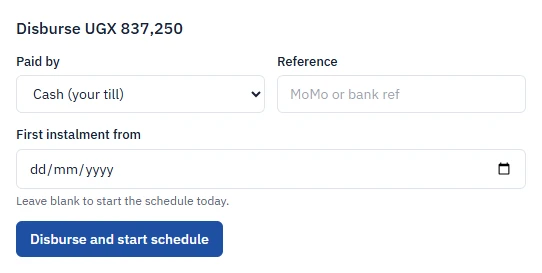
- In Disburse, choose Cash (your till), Mobile money or Bank, and enter the reference for mobile money or bank.
- Optionally set First instalment from to match the client's pay day.
- Disburse and start schedule. The client gets an SMS with the first due date.
Button blocked? See Pay-out is blocked.
Take a repayment
- Open the active loan (search the client, or from Collections).
- Receive a payment suggests the next instalment. The pay-off figure is beside the button.
- Enter the amount and how it was paid (reference for mobile money or bank), then Record payment.
- Print the Receipt from Payments and movements if the client wants paper; they also get an SMS.
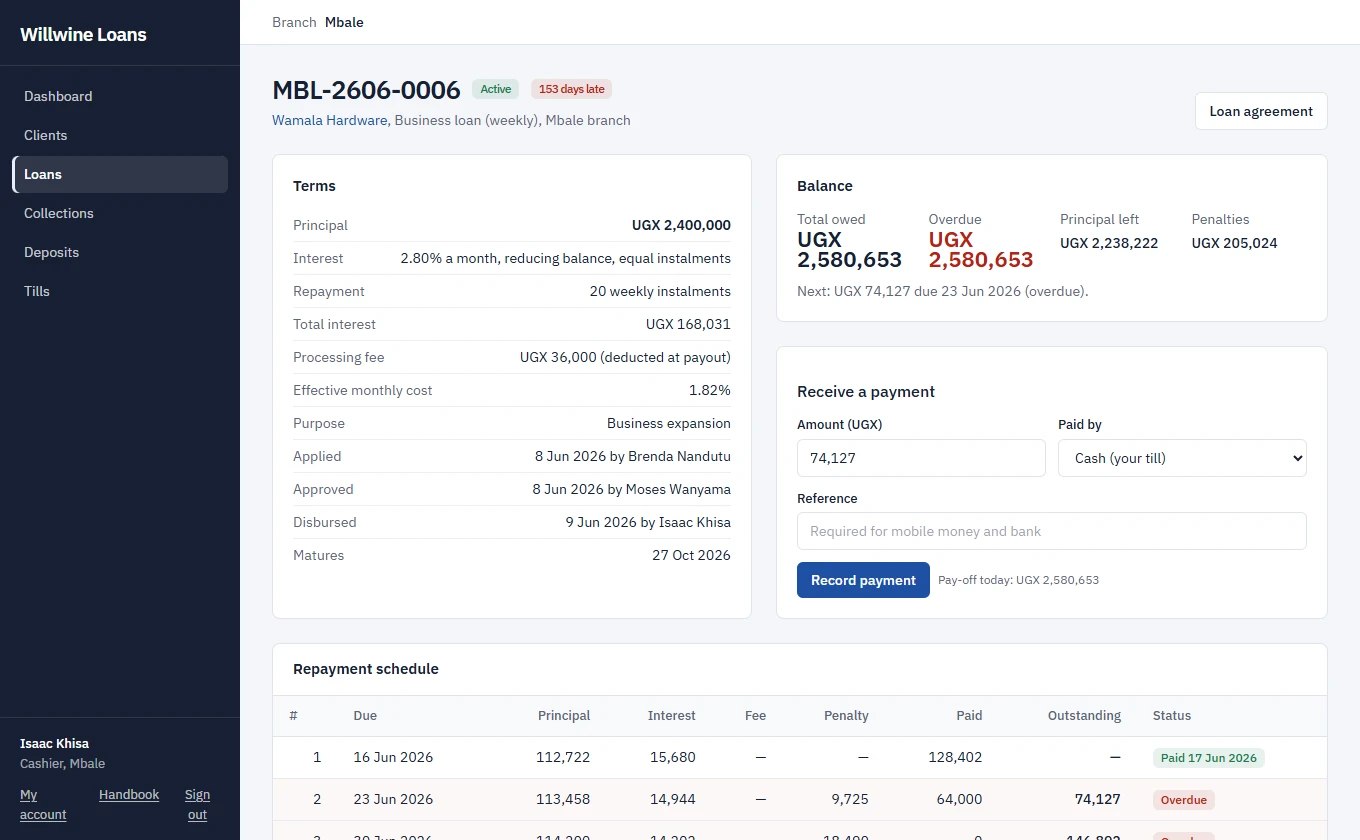
Each payment pays the oldest instalment first: penalty, then fee, then interest, then principal. See payment order.
Deposits and savings payouts
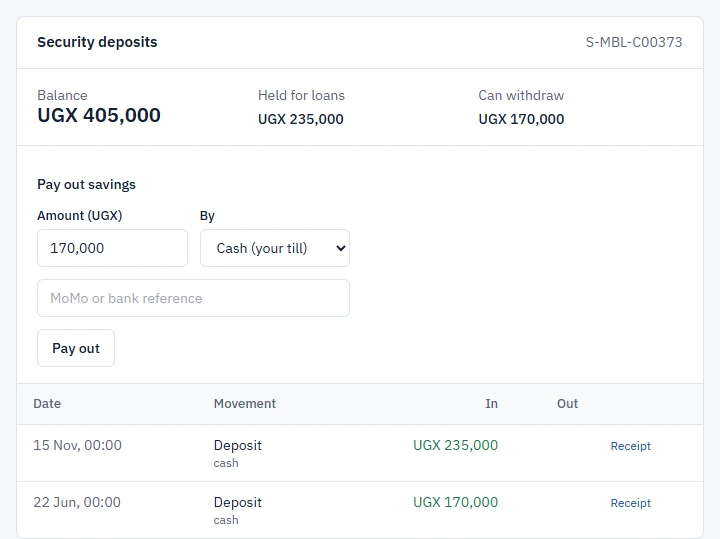
On the client's page, the Security deposits (or Savings) panel shows the balance, what is held for loans, and what can be withdrawn.
- Deposit: enter the amount and method, then Record deposit.
- Pay out savings: only up to Can withdraw; you can pay up to UGX 1,000,000 at a time.
Close and count
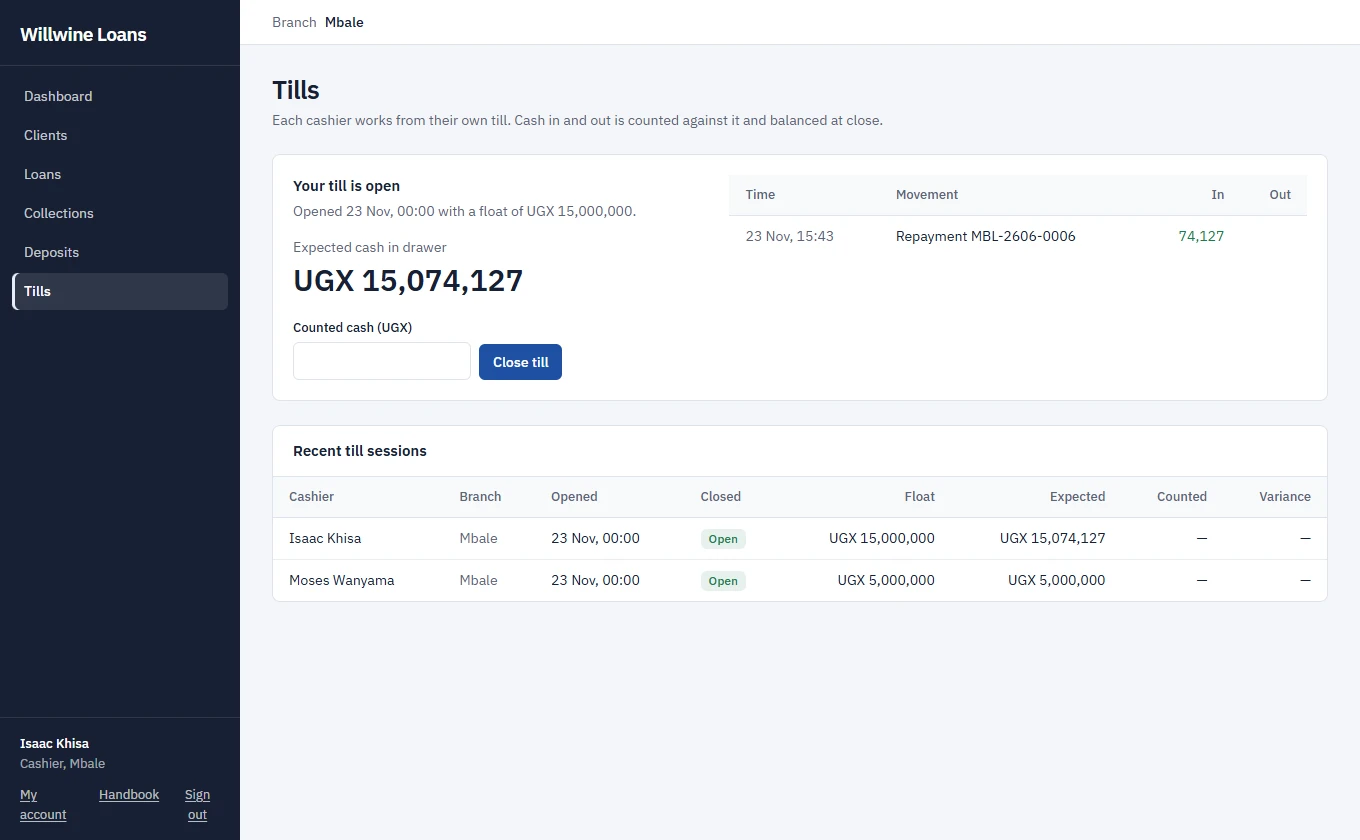
- Count the drawer and enter Counted cash.
- Close till. If it matches, you are done. If not, the difference waits for a manager to approve.
Tutorial by role
Branch manager
You run one branch: decide on applications, check the cashiers' tills, and deal with loans that go wrong. You can also do everything an officer and a cashier can.
You can
- Approve or reject up to UGX 5,000,000
- Approve till differences
- Reschedule, blacklist, pay a loan from savings
- Record expenses; change a client's officer
Rules
- You cannot approve an application you created
- You cannot pay out a loan you approved
- You cannot approve your own till
- Larger loans go to a director
Approve or reject
- Find loans waiting on the dashboard (Applications waiting) or Loans filtered to Appraised.
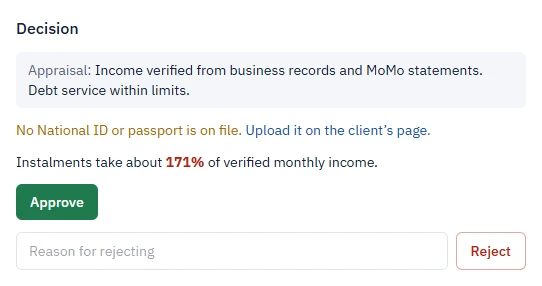
- Read the Decision panel: the appraisal, warnings (for example no ID on file), and how much of the client's income the instalments take (DSR; over 50% is red).
- Approve, or type a reason and Reject.
Approve a till difference
When a cashier closes short or over, Tills shows Differences waiting for your approval. Recount with the cashier, write what you found, and Approve. Only then is it posted to cash over/short.
Problem loans and clients
- Reschedule (active loan): moves the remaining principal into a new loan with new terms. Unpaid interest and penalties are waived; the screen shows how much first.
- Pay from savings: uses the client's savings, including the security deposit, to pay the loan.
- Blacklist client with a reason: no new loans until a director clears it.
- Loan officer → Change officer on the client page moves one client to another officer.
Tutorial by role
Director
You see every branch and set the rules: products, staff, settings. You approve loans of any size and can do anything in the system.
Only you
- Approve loans above UGX 5,000,000
- Add, change or deactivate directors
- Clear a blacklist; allow a third open loan
- Write off a loan at any age
- Branding and backups
Where to look
- Dashboard: today's picture
- Reports: the period
- Settings: organisation, SMS, branches, staff
- Loan products: terms
Watch the business
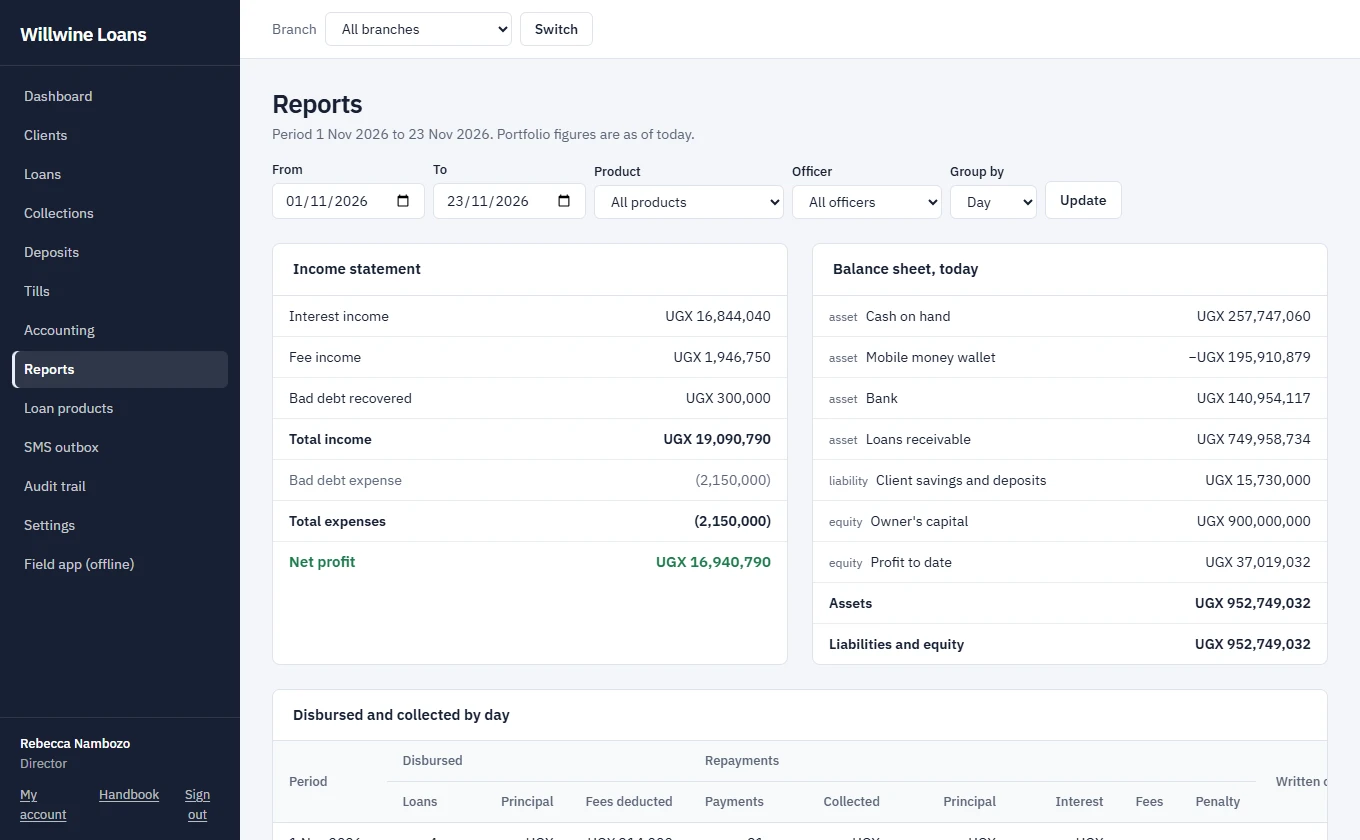
The dashboard shows the loan book, PAR 1/30/90, cash, and a per-branch table when All branches is selected. Reports gives an income statement and balance sheet for any dates, portfolio by product, each officer's book, and the Interest cap self-check (it should be empty).
Set up loan products
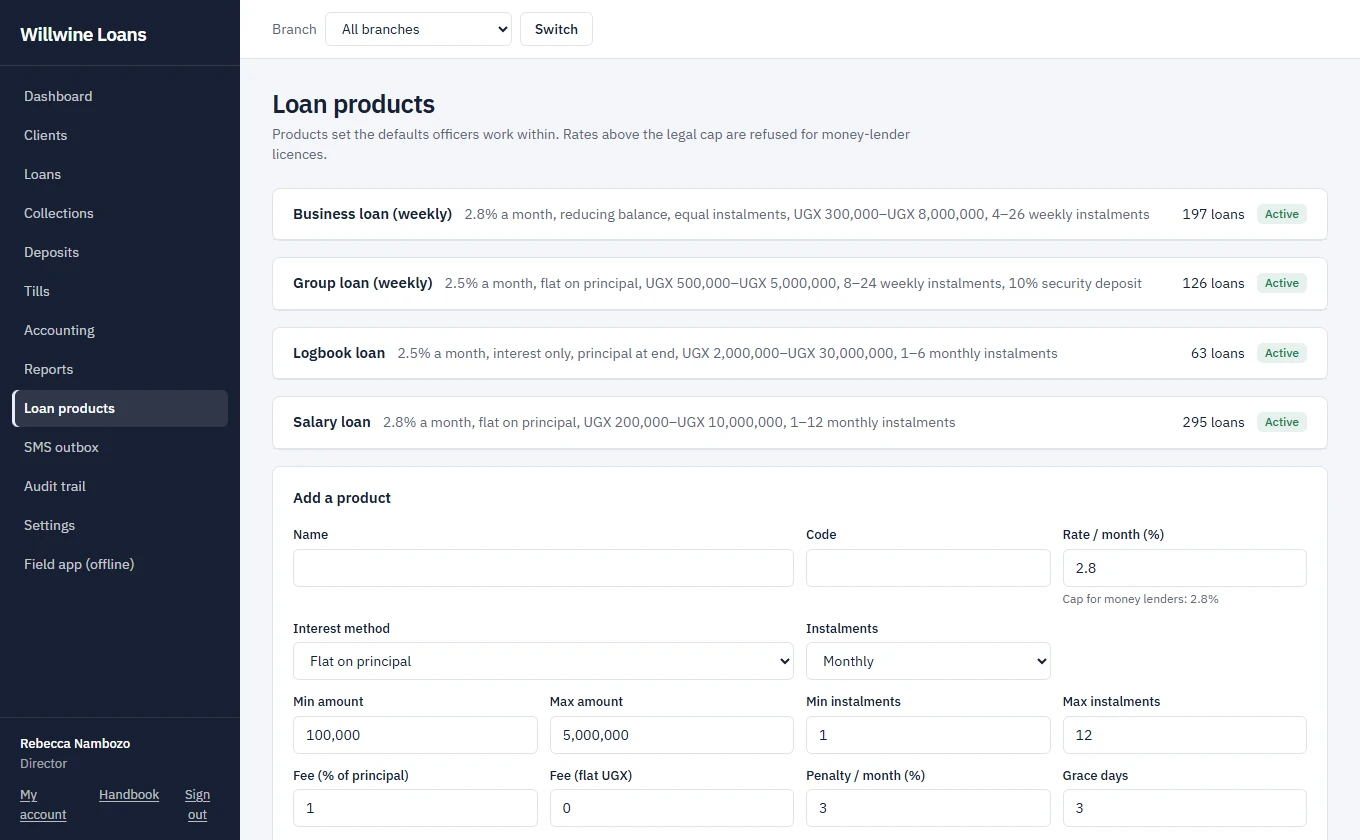
Loan products sets each product's rate, interest method, instalment frequency, amount and term limits, fee, penalty and grace days, and any security deposit. Changes never affect existing loans. Pause product stops new applications on it.
Manage staff
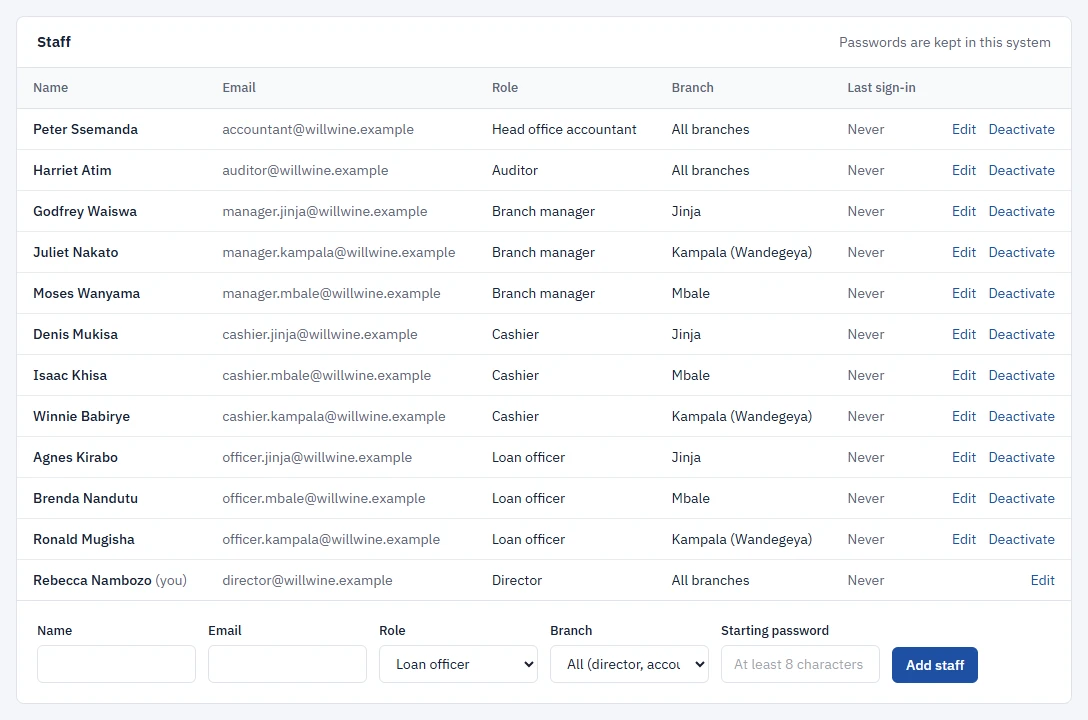
- Settings → Staff: enter name, email, role, branch and a starting password, then Add staff. Give them the password in person.
- Edit changes role or branch. Reset password, Unlock and Deactivate are there too.
- When an officer leaves or moves, use Hand over clients under Edit so their clients and open loans go to someone else.
Settings worth checking once
- Organisation and licence: registered name (printed on receipts), licence type (the cap applies to money lenders), voluntary savings (leave off unless your licence allows it), borrower portal and How to pay text.
- SMS: paste your bulksmsug.com API key. Without it, messages only reach the SMS outbox.
- Branding: the name, logo and support contact shown on every page.
- Backups (menu): set a daily encrypted backup and keep the passphrase safe.
- Branches: add a branch with a short code (it appears in every loan and receipt number).
Tutorial by role
Head office accountant
You keep the books right. Every pay-out, payment and deposit posts its own journal, so your work is the money that does not come through a loan: expenses, capital, transfers and adjustments.
You can
- Record expenses, add capital, move money between branches
- Post and reverse manual journals
- Write off loans more than 90 days late
- Edit products and most settings
Good to know
- Income is counted when paid (cash basis)
- Account 1100 cannot be posted by hand
- Figures follow the Branch selector
Everyday entries
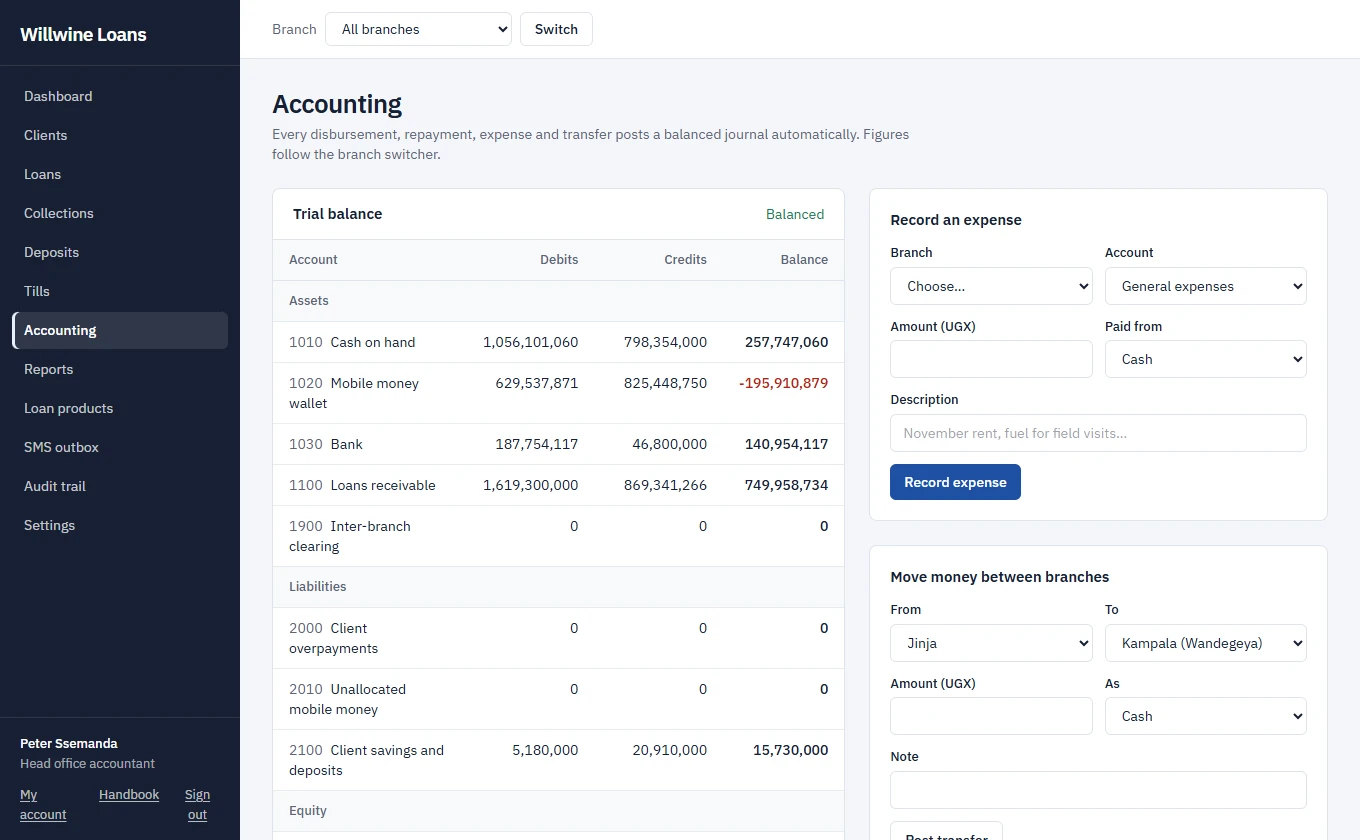
- Record an expense: branch, account (rent, salaries, transport…), amount, paid from, description.
- Move money between branches: both branches are posted at once.
- Add capital: money the owners put in.
Manual journals
- Under Journal entry, choose the branch and a date (today or earlier).
- Write a description an auditor can follow, and two to four lines with a debit or credit each. Debits must equal credits.
- Post entry. To undo, choose Reverse next to it (once only).
Write-offs
On a loan more than 90 days late, Write off moves what is left into bad debt. Money collected later goes through Record a recovery and counts as income.
Tutorial by role
Auditor
You can see everything in every branch and change nothing. Use it to check that loans, cash and the books agree, and that rules were followed.
- Audit trail: every approval, payment, change and sign-in event, with who and when. It cannot be edited.
- Reports: income statement, balance sheet, portfolio, and the interest cap self-check.
- Accounting: trial balance and every journal line.
- SMS outbox: every message sent to clients.
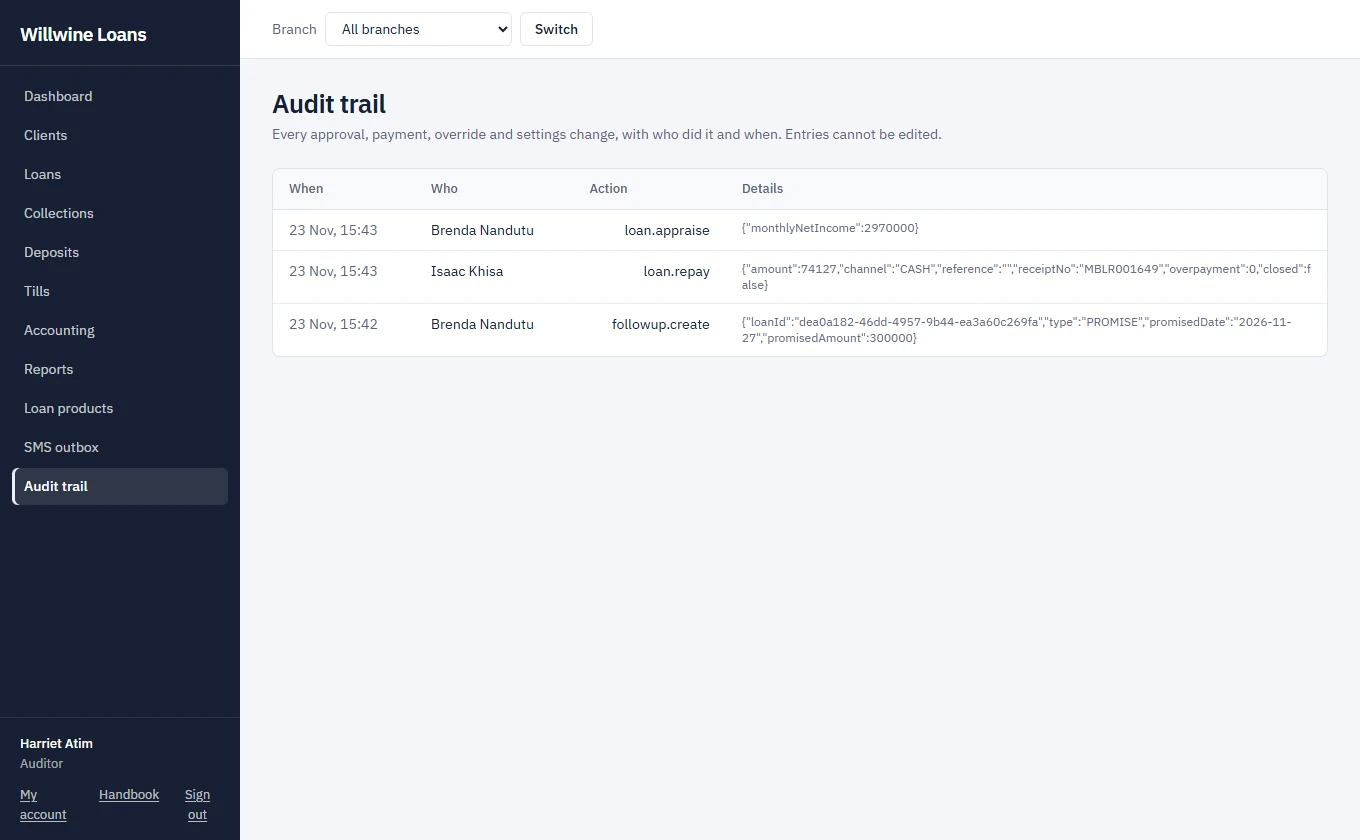
Trial balance reads Balanced · Interest cap self-check is empty · the Deposits page total matches account 2100 · till differences show who approved them.
For borrowers
Borrower: check your loan
See what you owe, your next payment, your schedule and your receipts on your phone. You cannot change anything there.
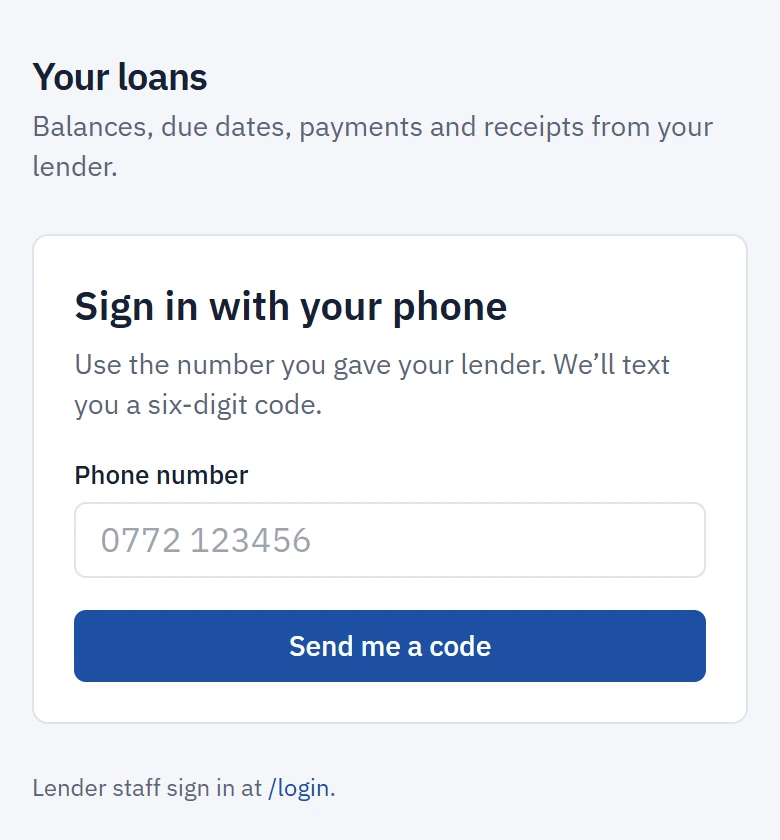
- Open the link your lender texted you (the address ends in
/portal). - Type the phone number you gave your lender and choose Send me a code.
- Enter the six-digit code from the SMS. It works once, for 10 minutes.
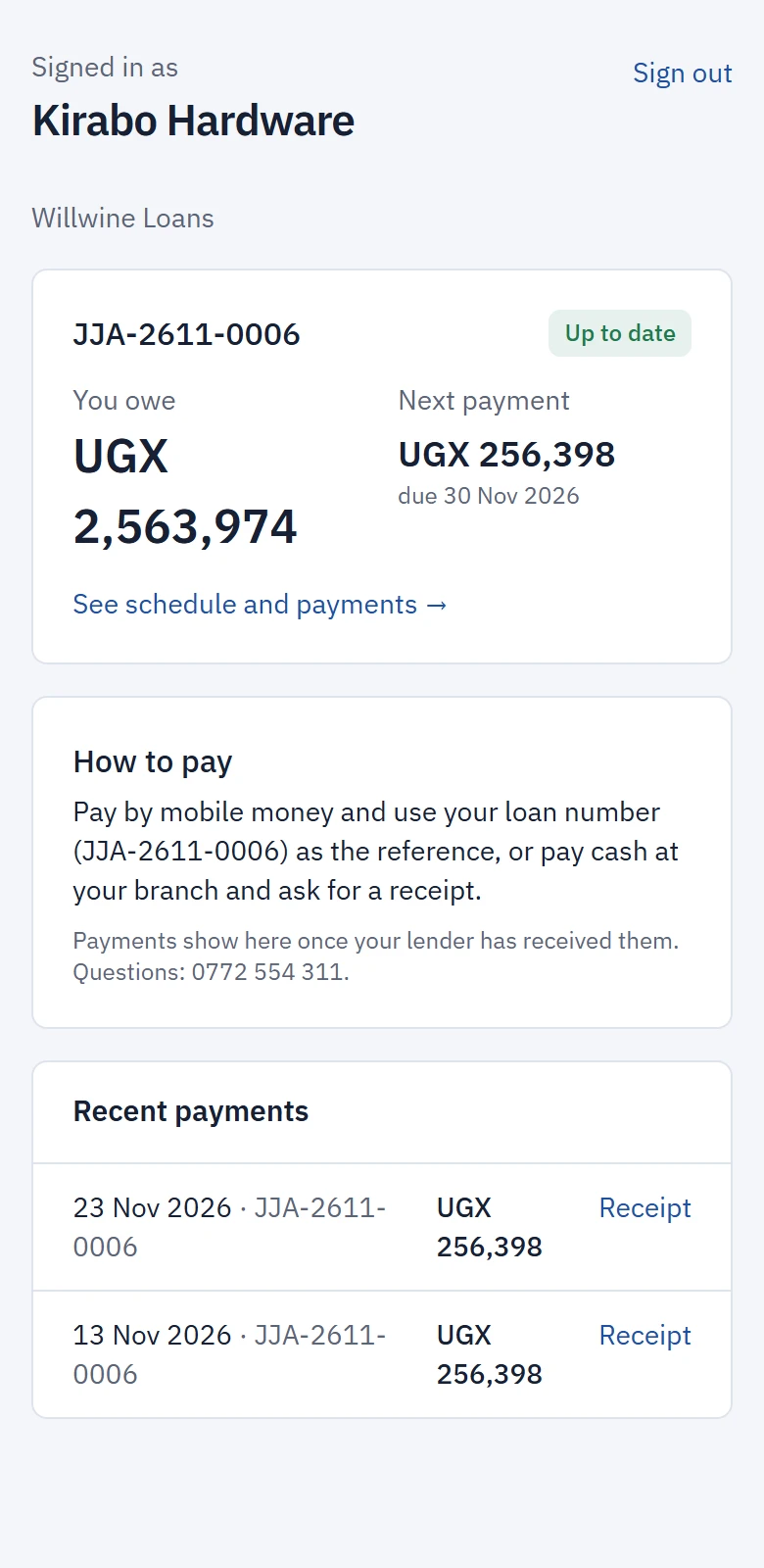
You also get an SMS for every payment, a reminder 3 days before each due date and on the day, and a notice if you are late.
Reference
Who can do what
| Action | Director | Accountant | Manager | Officer | Cashier | Auditor |
|---|---|---|---|---|---|---|
| Register and edit clients | ✓ | – | ✓ | ✓ | – | – |
| Applications, appraisals | ✓ | – | ✓ | ✓ | – | – |
| Approve or reject | any | – | ≤ 5M | – | – | – |
| Disburse | ✓ | – | ✓ | – | ✓ | – |
| Take repayments | ✓ | – | ✓ | MoMo, bank | ✓ | – |
| Use a till | ✓ | – | ✓ | – | ✓ | – |
| Approve till differences | ✓ | – | ✓ | – | – | – |
| Savings payouts | ✓ | – | ✓ | – | ≤ 1M | – |
| Reschedule, pay from savings | ✓ | – | ✓ | – | – | – |
| Write off | any age | 90+ days | – | – | – | – |
| Expenses | ✓ | ✓ | ✓ | – | – | – |
| Capital, transfers, journals | ✓ | ✓ | – | – | – | – |
| Reports, accounting (view) | ✓ | ✓ | ✓ | – | – | ✓ |
| Audit trail | ✓ | ✓ | – | – | – | ✓ |
| Products, settings, staff | ✓ | not directors | – | – | – | – |
Scenarios
Common scenarios
What to do, step by step, when these come up. Open one to read it.
A new client wants a loan today Officer → Manager → Cashier
- Officer registers the client and uploads their National ID.
- Officer takes the application and appraises it.
- Manager approves (a director if above UGX 5,000,000).
- If the product needs a security deposit, the cashier takes it first.
- Cashier disburses from an open till, and prints the Loan agreement for signing.
The loan is above UGX 5,000,000 Director
A branch manager cannot approve it. It stays Appraised until a director opens it and chooses Approve. The director can also pay it out themselves.
The application will not submit: "above the cap" Officer
For money lenders the monthly rate cannot be above 2.8%. Lower the Rate / month. An amber warning about fees is only a warning; you can still submit.
The client already has two open loans, or is blacklisted Officer, Director
A client can hold at most two open loans across all branches; only a director can submit a third. A blacklisted client gets no new loans until a director clears the flag on the client page.
Pay-out is blocked Cashier, Manager
| Message | Do this |
|---|---|
| Open your till before paying out cash | Open a till under Tills, or pay by mobile money or bank. |
| Not enough cash in your till | Pay by mobile money or bank, or get cash moved to the branch. |
| Your till is in a different branch | Pay from a till in the loan's own branch. |
| The approver cannot also disburse | Another cashier or manager pays it out. |
| Collect the security deposit first | Take the deposit on the client page; the message says how much. |
The client paid by mobile money or into the bank Cashier, Officer, Manager
Open the loan, Receive a payment, choose Mobile money or Bank and type the transaction reference. No till is needed.
The client paid more than they owe Cashier
The loan closes and the extra is held as an overpayment owed back to the client. Collateral is marked released and any security deposit can be withdrawn.
The client is late Officer, Manager
- Willwine has already texted reminders (3 days before, on the day) and overdue notices (1, 7, 14 and 30 days late).
- After the product's grace days, a penalty is added each night.
- The officer calls or visits and records a Promise to pay. Check Collections on the promised date.
- If the client can pay but not on these terms, the manager can Reschedule.
The loan is 90+ days late and cannot be collected Accountant, Director
- If the client has a security deposit, a manager can first use Pay from savings.
- The accountant or director chooses Write off. The loan shows Written off.
- Anything collected later: Record a recovery on the loan.
The till does not balance at close Cashier → Manager
The cashier enters the real count and closes; the till closes as short or over and waits. A different manager (or a director) recounts, notes the reason and approves. Nothing is posted until then.
The client wants their deposit back Cashier, Manager
Only Can withdraw is paid out: money held for open loans stays until those loans close. Cashiers pay up to UGX 1,000,000; above that a manager or director does it.
A staff member is locked out or forgot their password Director, Accountant
Locked: wait 15 minutes, or Unlock in Settings → Staff. Forgotten: a director uses Reset password under Edit and gives the new one in person; the person changes it in My account.
A loan officer leaves or changes branch Director
- Settings → Staff → Edit → Hand over clients: choose who takes their clients in each branch.
- Change their branch, or Deactivate them. They are signed out at their next click; their history stays.
Visiting clients with no signal Officer
Use the field app. Open it with signal in the morning, work offline, and check the Outbox when back in coverage. Anything the office refuses stays there with the reason in red.
A client asks for their balance Any staff
Tell them the Total owed or today's pay-off from the loan page, or use Text portal link so they can check it themselves any time in the portal.
Month end Accountant, Director, Auditor
- Every till is closed and every difference approved.
- Accounting: the trial balance reads Balanced; expenses for the month are recorded.
- Reports for the month: income statement, balance sheet, portfolio, cap self-check.
- Loans → Export CSV for a spreadsheet of the loan book.
Reference
Definitions
The words Willwine uses, in plain language.
- Appraisal
- The officer's check that the borrower can pay: verified income and what was found.
- Arrears, days in arrears
- Money due and not paid. Days in arrears counts from the oldest unpaid instalment's due date.
- Arrears bucket
- How late a loan is: Current, 1–30, 31–60, 61–90, or over 90 days.
- Branch
- An office of the lender with a short code (such as MBL). Every client, loan and till belongs to one.
- Interest cap
- The legal maximum of 2.8% a month for money lenders. Higher rates are refused.
- Cash basis
- Interest, fees and penalties count as income when they are paid, not when they fall due.
- Collateral
- Property pledged for a loan (logbook, land title, items). Held until the loan is repaid, then released.
- Disbursement
- Paying the loan out to the borrower. It starts the repayment schedule.
- DSR (debt service ratio)
- The share of the client's verified monthly income that the instalments take. Shown at approval; over 50% is red.
- Effective monthly cost
- Interest plus fees as a monthly percentage of the loan. Compared with the cap as a warning.
- Processing fee
- A percentage of the loan plus an optional flat amount. Either taken off the pay-out or added to the first instalment.
- Float
- The cash a cashier starts the day with, from the branch vault.
- Grace days
- Days after a due date before penalties start.
- Guarantor
- A person who promises to pay if the borrower does not. Name and phone are recorded with the loan.
- Instalment
- One scheduled payment: daily, weekly, every two weeks or monthly, depending on the product.
- Interest method
- How interest is worked out: flat (on the original amount), reducing balance (on what is still owed), or interest only (principal at the end).
- Loan book (outstanding principal)
- The principal still owed on all active loans.
- Maker-checker
- One person does something, a different person approves it. Applies to loans, pay-outs and till differences.
- MoMo
- Mobile money (MTN MoMo, Airtel Money).
- NIN
- Ugandan National Identification Number: 14 characters starting CM or CF. One client per NIN.
- Overpayment
- Money paid beyond everything owed. Held as owed back to the client.
- PAR (portfolio at risk)
- Principal of loans more than N days late, as a share of the whole loan book. PAR 30 = more than 30 days late.
- Payment order
- A payment goes to the oldest unpaid instalment first, and within it to penalty, then fee, then interest, then principal.
- Pay-off amount
- What the client must pay today to clear the loan completely.
- Penalty
- A charge on overdue amounts, added nightly after the grace days, up to the product's maximum.
- Borrower portal
- A website where clients see their own loans and receipts after signing in with a code sent to their phone.
- Principal
- The amount lent, before interest and fees.
- Loan product
- A loan type with set terms: rate, method, frequency, limits, fee, penalty and deposit.
- Receipt number
- Branch code, R and a running number, for example MBLR000124. Every payment and movement gets one.
- Recovery
- Money collected on a loan after it was written off. Counted as income.
- Reschedule
- Moving a loan's remaining principal into a new linked loan with new terms.
- Security deposit
- Savings a product requires the client to hold before pay-out and while the loan is open.
- Loan status
- Submitted, Appraised, Approved, Active, Closed, or Rejected, Rescheduled, Written off. See How a loan moves.
- Till
- A cashier's cash drawer for the day: opened with a float, closed with a count.
- Variance (till difference)
- The gap between expected and counted cash at close. Posted only after a manager approves it.
- Write-off
- Removing a loan that cannot be collected from the loan book as a bad debt.
No definition matches. Try the search at the top.
This tutorial covers the everyday work. For every detail, limit and setting, see the Willwine handbook.